YOUR MAC'S
HOURS,
ACCOUNTED FOR.
Private Screen Time analytics for macOS: exact app hours, distracting windows, browser history, and exportable reports.
Local-first. No app account. Optional encrypted device sync. No in-app telemetry.


Buy the app.
Not your data.
Not another subscription.
time.md shows exact daily hours, session timelines, browser history, category rules, and exportable files. Buy it once for $5. No subscription.
DOWNLOAD
Install the signed, notarized macOS release from timemd.app.
TRIAL
Set up the free trial in Stripe Checkout, then try the local dashboards, exports, and browser history on your Mac.
LICENSE
Keep using time.md with a $5 one-time license. There is no recurring subscription.
Everything you
need. Nothing
you don't.
OVERVIEW DASHBOARD
Total time, daily averages, focus blocks, and streaks in one compact metrics row.
CALENDAR HEATMAP
Year, month, week, and day views. See when your time spikes with calendar grids shaded by intensity.
TOP APPS BREAKDOWN
Ranked usage tables with session counts, percentage bars, and stacked category charts. Know exactly what eats your time.
TRENDS & PATTERNS
Interactive area charts with hover details, drag selection, and zoom presets. Spot patterns across any time range.
DISTRACTING HOURS
A weekday-by-hour heatmap shows your most distracting windows. Filter by work hours or evening presets.
FOCUS STREAKS
Track consecutive focus days with current and longest streak counters. Aggregate by week or month for the bigger picture.
EXPORT ANYWHERE
Export CSV, JSON, YAML, Markdown, or Obsidian notes. Scope exports to your filters, apps, categories, sections, and date range.
LOCAL AUTO-SAVE
Keep a readable JSON snapshot and optional named live auto-export refreshed locally for scripts, notes, and automation.
Three steps.
No guesswork.
DOWNLOAD
Grab the current direct-release ZIP, move time.md to Applications, and open it on macOS 14 Sonoma or newer.
GRANT ACCESS
Give Full Disk Access so time.md can read Apple's local Screen Time and browser history databases. The data remains on-device.
REPORT
Filter by app, category, date range, or hour. Export CSV, JSON, Markdown, or Obsidian reports when you need receipts.
Looks like
the app.
GEIST TYPOGRAPHY
Headings match the app, body copy stays readable, and numbers line up when tables need it.
TIME.MD PALETTE
Geist neutrals, blue accents, and the same light and dark tokens used in the macOS app.
TONAL SURFACES
Hierarchy comes from cards, borders, tight radii, and contrast instead of noisy decoration.
PRODUCT-FIRST CHROME
The site uses real app screens and the same restrained visual system as time.md.
Current app
screenshots.
These previews match the latest onboarding and marketing site captures. They follow the theme toggle: system, light, and dark visitors see the matching app screenshots.
Turn your vault
into a Screen Time
dashboard.
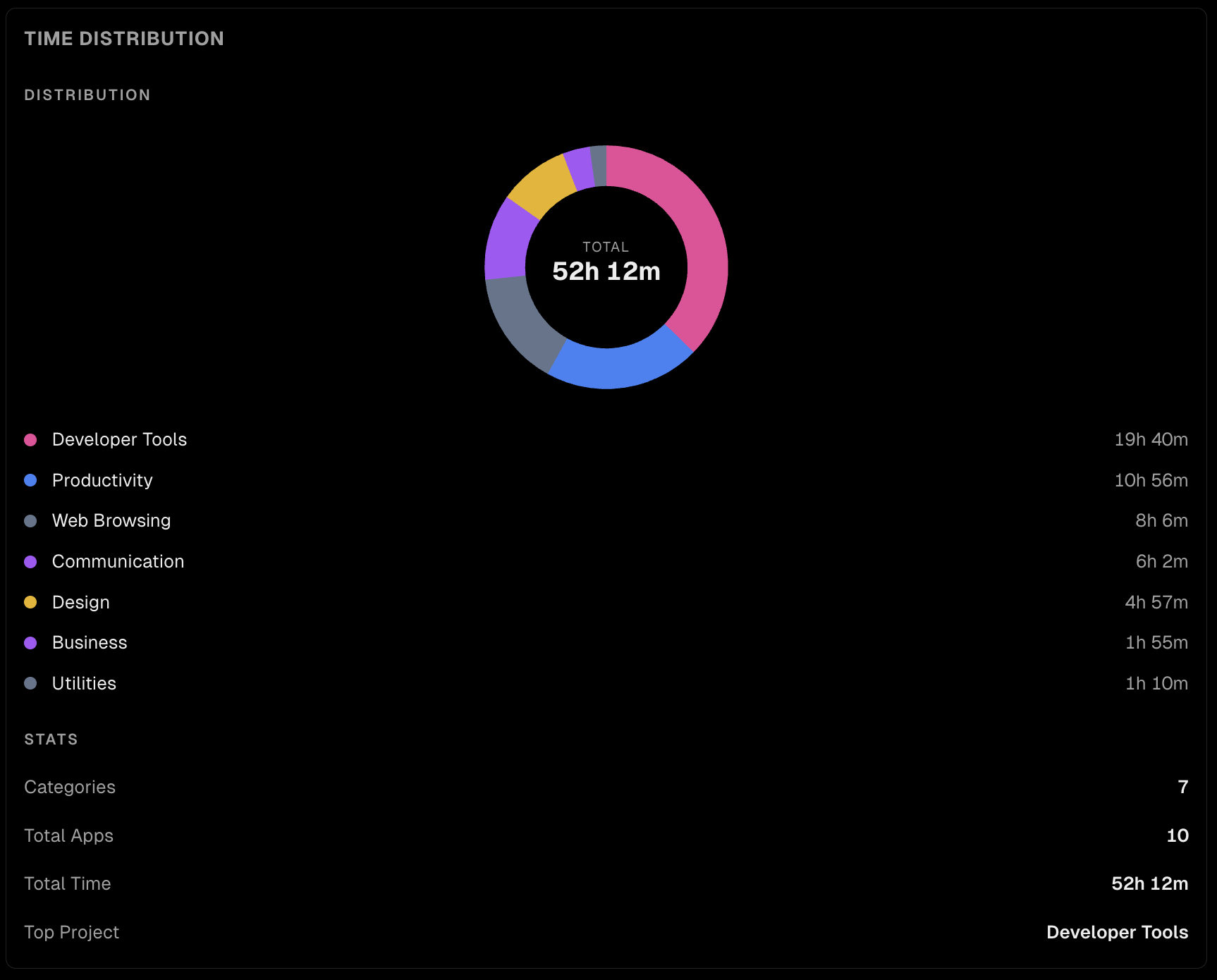
The time.md Visualizations Studio shows the same chart blocks available in our Obsidian plugin. Pick a block, switch palettes, preview realistic screen-time data, then copy the exact timemd code fence into your notes.
Your data stays
on your machine.
Period.
LOCAL SQLITE
All data lives in a local SQLite database on your Mac. Reads from Screen Time's own data store.
NO TELEMETRY
Only license/trial validation and update checks go online. No analytics SDKs. No crash reporters. No screen-time uploads.
NO APP ACCOUNT
The desktop app has no sign-up, no password, and no product analytics account. License/trial validation never includes your usage database.
Built for people
who check the numbers.
DEVELOPERS
See how much time you spend in Xcode compared with Stack Overflow. Adjust your focus blocks from there.
FREELANCERS
Track billable app usage across projects. Export CSV reports for clients with exact session data.
STUDENTS
Identify your most distracting hours and apps. Build study streaks with the focus tracker.
DIGITAL MINIMALISTS
See what your Mac gets used for. Plain data, no judgments, no gamification.
Every question.
Answered.
GETTING STARTED
Install time.md, complete onboarding, activate a trial or license, grant Full Disk Access, and confirm data is flowing.
PERMISSIONS GUIDE
Understand exactly why macOS asks for Full Disk Access, Accessibility, Input Monitoring, or admin approval.
EXPORT WORKFLOWS
Use CSV, JSON, YAML, Markdown, Obsidian, live auto-export, scheduled exports, and filtered reports.
TROUBLESHOOTING
Fix empty data, missing browser history, activation issues, blocked sites, input tracking, CLI setup.
Questions before
you buy.
Does time.md upload my Screen Time data?
No. Raw Screen Time sessions, browser history, optional input tracking, categories, and exports stay on your Mac. Entitlement checks send only license/trial fields such as a key or token, app version, and a random device ID.
Why does it need Full Disk Access?
macOS protects Apple's local Screen Time database and browser history files. Full Disk Access lets time.md read those local databases for analysis. It does not give time.md permission to upload them.
Which browsers are supported?
Safari, Chrome, Firefox, Arc, Brave, and Edge are supported when their local history files are present and readable. Private/incognito windows generally do not appear because browsers avoid writing them to normal history.
Is this a subscription?
No. time.md has a free trial and a $5 one-time macOS desktop license. There is no app account and no recurring subscription.
Which macOS versions work?
time.md targets macOS 14 Sonoma or newer.
Is the app signed and notarized?
The release pipeline builds, notarizes, zips, and publishes the macOS app for direct distribution. Sparkle update metadata is signed so installed apps can verify updates.
Can I use it offline?
Local analytics, exports, and review screens run on your Mac. Initial trial setup, license activation, and update checks need internet access; cached paid activation can continue through temporary verification failures.
How is this different from Apple Screen Time?
Apple Screen Time is a summary view. time.md is an analysis workbench: session timelines, heatmaps, custom categories, browser history context, CLI access, and CSV/JSON/YAML/Markdown/Obsidian exports.
How do refunds or support work?
Email cody@isolated.tech for activation, receipt, duplicate-charge, download, or refund questions. Do not send your full Screen Time export unless you explicitly want it reviewed.
How does checkout work?
Trial setup and license purchases open Stripe Checkout. Trial checkout issues a trial token; paid checkout creates an activation key for the one-time macOS desktop license. Neither flow includes your local Screen Time data.
START FREE.
OWN YOUR TIME.
Download the current macOS build. Keep it with a $5 one-time license.
Your Screen Time data stays on your Mac.